
Vim Interface Overview
Architecture and the complete component directory for coc.nvim's Vim interface.
coc.nvim project documentation · Content sources and maintainers
Vim Interface
Welcome to the Vim Interface specification for coc.nvim. This chapter provides a complete, authoritative reference for integrating, configuring, and extending coc.nvim from Vimscript and Neovim Lua, directly sourced from the official doc/coc.txt.
Introduction & Architecture
coc.nvim acts as a high-performance LSP client and extension runtime running as an external Node.js background process. It connects to Vim / Neovim over asynchronous msgpack-RPC channels, ensuring editing in the foreground remains non-blocking and buttery smooth (60fps UI).
The interface between Vim and coc.nvim is structured into six core components:
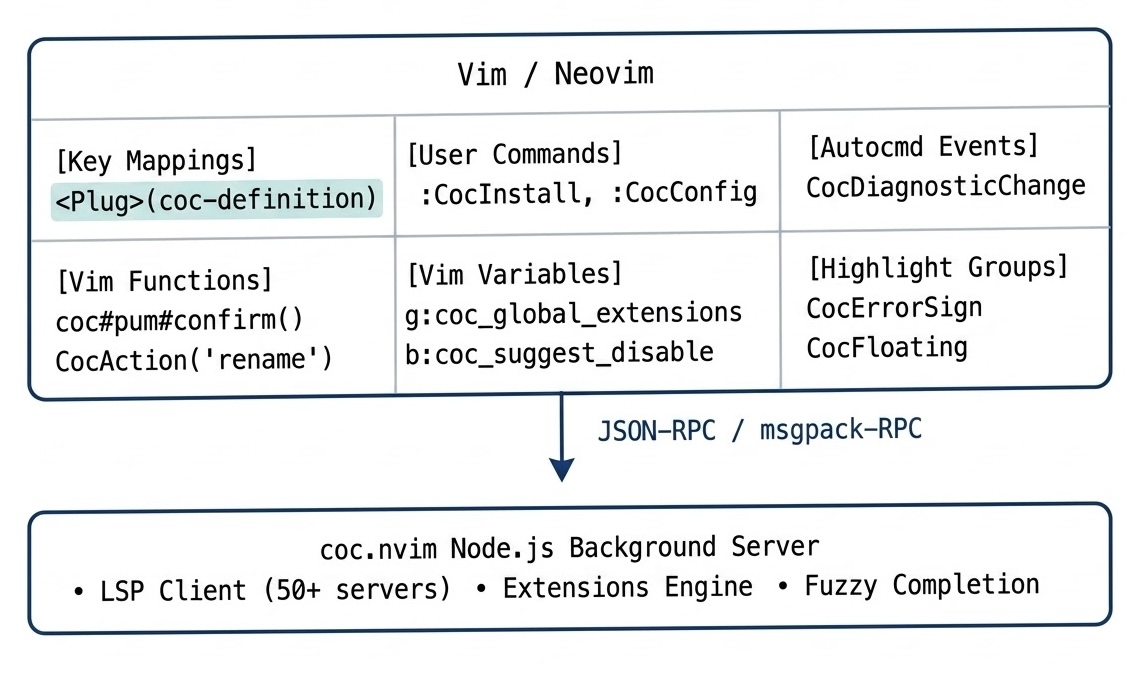
Vim Interface Component Directory
Explore each dedicated reference section below:
| Component | Description | Reference Link |
|---|---|---|
| Key Mappings | All 38+ <Plug> mappings for definitions, references, diagnostics, formatting, rename, code actions, text objects, and multi-cursor. | Go to Key Mappings |
| Variables | Complete reference of Global (g:), Buffer (b:), Window (w:), and Environment ($) configuration and state variables. | Go to Variables |
| Functions & Actions | Built-in Vimscript functions (coc#*, coc#pum#*, coc#float#*) and the complete 60+ CocAction() / CocRequest() catalog. | Go to Functions |
| Highlight Groups | Over 115 highlight groups for diagnostics, float windows, popup completion menu, inlay hints, semantic tokens, and trees. | Go to Highlight Groups |
| Commands & Autocmds | Ex commands (:CocStart, :CocConfig, :CocList) and User autocommand events (CocDiagnosticChange, CocStatusChange). | Go to Commands & Autocmds |
Runtime Flow & Best Practices
- Wait for Service Initialization:
Certain functions only execute once the background server is live. Checkg:coc_service_initializedor listen toCocNvimInit. - Buffer Local Disabling:
You can selectively disable autocompletion or auto-formatting per buffer (e.g. in large log files or markdown scratchpads) by settingb:coc_suggest_disable = 1andb:coc_disable_autoformat = 1. - Statusline Integration:
Callcoc#status()and inspectb:coc_diagnostic_infoin your statusline / winbar configuration for instant diagnostic indicators and background task spinners.