
coc.nvim wrapper for the jedi-language-server for Python
Published Package Summary
coc-jedi
coc.nvim wrapper for Python's jedi-language-server.
If you would like to know more about why coc-jedi is useful, please read this blog post.
Installation
Install in NeoVim / Vim with one of the following techniques:
1. CocInstall
:CocInstall coc-jedi
2. Vim Package Manager
If using vim-plug:
Plug 'pappasam/coc-jedi', { 'do': 'yarn install --frozen-lockfile && yarn build', 'branch': 'main' }
I personally use vim-packager, so if you'd like to go down the package rabbit hole, I suggest giving that a try.
Note: this extension is incompatible with coc-python. Uninstall coc-python before using coc-jedi.
Additional Diagnostics
If you would like diagnostics (from pylint, mypy, etc.), we recommend using the powerful diagnostic-language-server.
If using Neovim/coc, this can easily be done with coc-diagnostic. An example configuration for pylint in your coc-settings.json:
"diagnostic-languageserver.filetypes": {
  "python": "pylint"
},
"diagnostic-languageserver.linters": {
  "pylint": {
    "sourceName": "pylint",
    "command": "pylint",
    "debounce": 100,
    "args": [
      "--output-format",
      "text",
      "--score",
      "no",
      "--msg-template",
      "'{line}:{column}:{category}:{msg} ({msg_id}:{symbol})'",
      "%file"
    ],
    "formatPattern": [
      "^(\\d+?):(\\d+?):([a-z]+?):(.*)$",
      {
        "line": 1,
        "column": 2,
        "endColumn": 2,
        "security": 3,
        "message": 4
      }
    ],
    "rootPatterns": ["pyproject.toml", "setup.py", ".git"],
    "securities": {
      "informational": "hint",
      "refactor": "info",
      "convention": "info",
      "warning": "warning",
      "error": "error",
      "fatal": "error"
    },
    "offsetColumn": 1,
    "offsetColumnEnd": 1,
    "formatLines": 1
  }
}
If you experience any problems with pylint you can configure coc-diagnostic to use flake8 as a linter instead:
  "diagnostic-languageserver.filetypes": {
    "python": "flake8",
  },
 "diagnostic-languageserver.linters": {
    "flake8": {
      "sourceName": "flake8",
      "command": "flake8",
      "debounce": 200,
      "rootPatterns": [".git", "pyproject.toml", "setup.py"],
      "args": [
        "--ignore=E402,C901,W503,W504,E116,E702,C0103,C0114,C0115,C0116,C0103,C0301,W0613,W0102,R0903,R0902,R0914,R0915,R0205,W0703,W0702,W0603",
        "--format=%(row)d,%(col)d,%(code).1s,%(code)s: %(text)s",
        "-"
      ],
      "offsetLine": 0,
      "offsetColumn": 0,
      "formatLines": 1,
      "formatPattern": [
        "(\\d+),(\\d+),([A-Z]),(.*)(\\r|\\n)*$",
        {
          "line": 1,
          "column": 2,
          "security": 3,
          "message": 4
        }
      ],
      "securities": {
        "W": "info",
        "E": "warning",
        "F": "info",
        "C": "info",
        "N": "hint"
      }
    }
  },
Code Formatting
You can also use diagnostic-language-server for code formatting:
"diagnostic-languageserver.formatFiletypes": {
  "python": ["black", "isort", "docformatter"]
},
"diagnostic-languageserver.formatters": {
  "black": {
    "command": "black",
    "args": ["-q", "-"]
  },
  "isort": {
    "command": "isort",
    "args": ["-q", "-"]
  },
  "docformatter": {
    "command": "docformatter",
    "args": ["-"]
  }
}
Alternatively, you can rely on non-LSP-based tooling for your code formatting needs (which I do, for performance and logging reasons). One great tool the adventurous types might consider: https://github.com/pappasam/vim-filetype-formatter.
FAQ / Debugging
No completion / goto definition while using Conda, homebrew, asdf, etc
If you haven't installed a dependency in a virtualenv and/or don't have a virtualenv active, Jedi may have trouble locating your dependencies. If you encounter issues with completion / anything else, install jedi-language-server in your Python environment (system Python, conda, homebrew, etc) and update your coc-settings.json with the path to your jedi-language-server executable. Example:
{
  "jedi.executable.command": "/PATH/TO/JEDI/LANGUAGE/SERVER"
}
Note: replace /PATH/TO/JEDI/LANGUAGE/SERVER with your path. If jedi-language-server is in your home folder and your username is potato its path would probably be /home/potato/jedi-language-server.
If this does not resolve your issue, please create a GitHub issue describing your Python environment and problem.
Relative imports don't complete correctly
Relative imports should normally work correctly, but if they do not, your LSP workspace root path is most likely incorrect. For example, when you use a file explorer like ranger, your root path will likely be the same directory as the file you're opening. When you open a file directly with Vim, your root path is your current working directory. See this GIF:
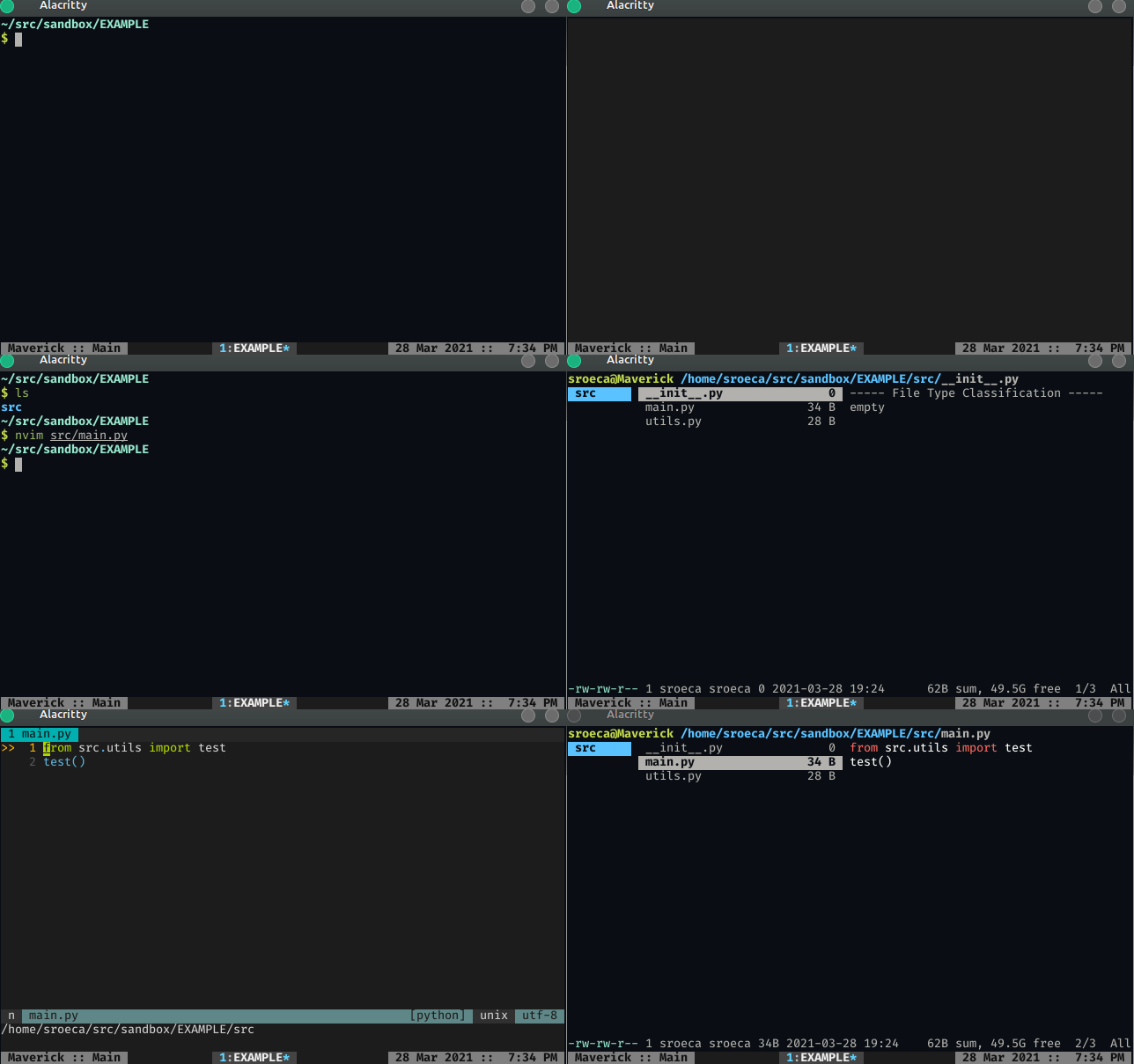
When Vim's current working directory is deep within a project's tree, things like relative imports won't work correctly. They ONLY work when Vim's current working directory (and, therefore, your LSP workspace) can be outside of the package where relative imports take place.
In short: if you want relative imports to work correctly, you should generally open Vim in the root of your project. Some file explorers seem to prevent this from happening.
License
MIT
Credits
- Built using create-coc-extension.
- Written by Samuel Roeca
- coc.nvim wrapper for the jedi-language-server for Python
- onLanguage:python
Want to build, test, or contribute to coc.nvim extensions? Explore our official SDK and testing toolkits.
Open Developer GuideVersion History
Published with coc-jedi@0.36.1 as CHANGELOG.md.
Changelog
All notable changes to this project will be documented in this file.
The format is based on Keep a Changelog, and this project adheres to Semantic Versioning.
0.36.1
- Jls 0.41.1
0.36.0
- Jls 0.41.0
0.35.0
- Jls 0.40.0
- Diagnostics are enabled by default
0.34.0
- Jls
0.39.0 - Diagnostics are disabled by default
0.33.1
- Ensure every
package.jsoncontributes.configurationproperty has a default value. Resolves a weird parsing edge case for implied null values, and has the added benefit of making things more explicit (omitted values result innull, by default).
0.33.0
- Jls
0.38.0 - Add initialization option
jedi.workspace.environmentPath
0.32.0
- Jls
0.37.0
0.31.1
- Jls
0.36.1
0.31.0
- Jls
0.36.0
0.30.1
- Jls
0.35.1
0.30.0
- Jls
0.35.0
0.29.15
- Remove usage of
--system-site-packagesbecause it causedjedi-language-serverto be installed in the system Python for some users. Instead, we rely on maually modifyingpyvenv.cfgafter the virtualenv is created andjedi-language-serveris installed. See: https://github.com/pypa/pip/issues/1408 and https://github.com/pappasam/coc-jedi/issues/48
0.29.14
Fix
- Remove usage of
--upgrade-deps; that wasn't introduced until Python 3.9, which would be broken support for earlier Python versions.
0.29.13
- Jedi's virtualenv now explicitly has access to the system's site-packages. Resolves https://github.com/pappasam/coc-jedi/issues/11 and https://github.com/pappasam/coc-jedi/issues/35.
0.29.12
- Jls
0.34.12
0.29.11
- Jls
0.34.11
0.29.10
- Jls
0.34.10
0.29.9
- Jls
0.34.9
0.29.8
- Jls
0.34.8
0.29.7
- Jls
0.34.7 - New option
completion.ignorePatterns
0.29.6
- Jls
0.34.6
0.29.5
- Jls
0.34.5
0.29.4
- Jls
0.34.4 - Support debugging message capability.
0.29.3
- Jls
0.34.3
0.29.2
- Jls
0.34.2
0.29.1
- Jls
0.34.1
0.29.0
- Jls
0.34.0
0.28.0
- Jls
0.33.0
0.27.0
- Jls
0.32.0
Added
The following new options (documented in the README):
- jedi.hover.enable
- jedi.hover.disable.class.all
- jedi.hover.disable.class.names
- jedi.hover.disable.class.fullNames
- jedi.hover.disable.function.all
- jedi.hover.disable.function.names
- jedi.hover.disable.function.fullNames
- jedi.hover.disable.instance.all
- jedi.hover.disable.instance.names
- jedi.hover.disable.instance.fullNames
- jedi.hover.disable.keyword.all
- jedi.hover.disable.keyword.names
- jedi.hover.disable.keyword.fullNames
- jedi.hover.disable.module.all
- jedi.hover.disable.module.names
- jedi.hover.disable.module.fullNames
- jedi.hover.disable.param.all
- jedi.hover.disable.param.names
- jedi.hover.disable.param.fullNames
- jedi.hover.disable.path.all
- jedi.hover.disable.path.names
- jedi.hover.disable.path.fullNames
- jedi.hover.disable.property.all
- jedi.hover.disable.property.names
- jedi.hover.disable.property.fullNames
- jedi.hover.disable.statement.all
- jedi.hover.disable.statement.names
- jedi.hover.disable.statement.fullNames
0.26.2
- Jls
0.31.2
0.26.1
- Jls
0.31.1
0.26.0
- Jls
0.31.0
0.25.3
- Jls
0.30.3
0.25.2
- Jls
0.30.2
0.25.1
- Jls
0.30.1
0.25.0
- Jls
0.30.0 - Add jedi.codeAction.nameExtractFunction and jedi.codeAction.nameExtractVariable configuration.
0.24.0
- Jls
0.29.0
0.23.7
- Jls
0.28.8
0.23.6
- Jls
0.28.7
0.23.5
- Jls
0.28.6
0.23.4
- Jls
0.28.5
0.23.3
- Jls
0.28.4
0.23.2
- Jls
0.28.3
0.23.1
- Jls
0.28.2
0.23.0
- Jls
0.28.1(uses pydantic, should fix some long-standing bugs)
0.22.2
- Jls
0.27.2
0.22.1
- Jls
0.27.1
0.22.0
Added
- jedi.workspace.symbols.ignoreFolders
Changed
- Jls
0.27.0 - jedi.workspace.maxSymbols change to jedi.workspace.symbols.maxSymbols
0.21.0
- Jls
0.26.0 - Add jedi.workspace.maxSymbols configuration.
0.20.8
- Jls
0.25.7
0.20.7
- Jls
0.25.6
0.20.6
- Jls
0.25.5
0.20.5
Fixed
- coc-managed pip is now updated, along with jedi language server, to suppress pip warnings. See https://github.com/pappasam/coc-jedi/pull/28
- activation events now only run for Python files. See https://github.com/pappasam/coc-jedi/pull/27
0.20.4
- Jls
0.25.4
0.20.3
- Jls
0.25.3
0.20.2
- Jls
0.25.2
0.20.1
- Jls
0.25.1
0.20.0
- Jls
0.25.0(better docstring markdown support!)
0.19.0
- Jls
0.24.0 - Add configuration option
jedi.jediSettings.caseInsensitiveCompletion.
0.18.1
- Jls
0.23.1
0.18.0
- Jls
0.23.0 - Add configuration option
jedi.completion.resolveEagerly.
0.17.0
- Jls
0.22.0 - Update documentation about executable command, resolving https://github.com/pappasam/coc-jedi/issues/8
- Reverse behavior for startupMessage, resolving https://github.com/pappasam/coc-jedi/issues/16
0.16.0
Added
jedi.workspace.extraPaths, add additional paths for Jedi's analysis.
Changed
- Jls
0.21.0
0.15.1
- Jls
0.20.1
0.15.0
- Jls
0.20.0
0.14.4
- Jls
0.19.5
0.14.3
- Jls
0.19.4
0.14.2
- Jls
0.19.3
0.14.1
Changed
- Jls
0.19.1
0.14.0
Changed
- Jls
0.19.0
0.13.2
Changed
- Jls
0.18.1
0.13.1
Fixed
- Array types in
package.jsonare now accurately listed. Before, they caused linting errors.
0.13.0
Changed
- Jls
0.18.0
0.12.2
Changed
- Jls
0.17.1
0.12.1
Changed
- Removed restarting on configuration change. Based on its behavior, it was more of a bug than a feature.
Fixed
coc-settings.jsonconfiguration types no longer cause linting errors
0.12.0
Added
- Configuration option to automatically import big modules (like Numpy):
jedi.jediSettings.autoImportModules
Changed
- Jls
0.17.0
0.11.0
Added
- Configuration option to disable jedi snippets:
jedi.completion.disableSnippets
Changed
- Jls
0.16.0
0.10.1
Changed
- Updated package metadata / readme
0.10.0
Changed
- Jls
0.15.0 - Add
jedi.markupKindPreferredconfiguration
0.9.1
Changed
- Obtain the current jls version when obtaining the default jls environment. If the current version is not equal to the expected version, re-install. This should make updates seamless for people who are "git pulling" the latest changes and may not be deleting an existing venv.
0.9.0
Changed
- Jls
0.14.0
0.8.1
Changed
- Replace
fs.rmdirSyncwithrimraf; already available in coc engine / relied upon and supports older nodes.
0.8.0
Added
- Link to GitHub repository link in
package.json
Changed
- Due to Coc limitations involving postinstall hooks (https://github.com/neoclide/coc.nvim/issues/1909), automatic installation of jedi-language-server now takes place on coc-startup without npm scripts
0.7.4
Changed
python3instead ofpythonin install script to be more widely compatible
0.7.3
Changed
- Jls
0.13.2
0.7.2
Changed
- Fixed option parsing for executable command and args
0.7.1
Changed
- TIL:
npmignoreandgitignoreare mutually exclusive for npm uploads.
0.7.0
Added
- Now automatically installs
jedi-language-serverin managed virtual environment for non-Windows environments.
Removed
- Reference to pipx for manual installation. That was a bandaid anyway.
0.6.0
Added
- Manage specific jedi-language-server by relying on pipx. Otherwise, consider user configuration and path configuration to determine location of Python executable
- Improve startupMessage to help people debug their setup if they experience issues
- jedi-language-server version is now in package.json
- jedi-language-server name is not in package.json
- Configuration options:
jedi.executable.command: jedi-language-server executable. Coc-managed defaults if not specifiedjedi.executable.args: args passed to jedi-language-server executable. Ignored if command is nulljedi.startupMessage: enables (or disables the startup message)
0.5.0
Added
- Documentation for all config options here
Changed
- Pass jedi-rooted configuration to initializationOptions
enabledchanged toenable. I see the option spelled this way in way more coc plugins and I'd like to be consistent with the ecosystem.
0.4.0
Added
jedi.enabledto disable extension without needing to uninstalljedi.trace.serverfor debugging
0.3.1
Added
- basic "server started" message on server ready
0.3.0
Removed
- Remove deprecated configuration options from
package.json
0.2.1
Removed
- Unnecessary executable checking. This ended up checking existence even when non-Python files were opened, which would be annoying for people working across multiple languages. This ended up removing a dependency (which) and relying on the better error message provided by coc out of the box.
0.2.0
Added
- Support signatureHelp
Changed
- Error message when missing jedi-language-server executable now prints as error
0.1.0
Added
- This CHANGELOG
- Configuration helpers for diagnostic configuration
Contributed Commands
All contributes.commands entries from the published package manifest for coc-jedi@0.36.1.
This package does not declare any contributed commands.
Configuration Schema
All contributes.configuration entries from the published package manifest, including each raw property schema for coc-settings.json.
Raw JSON Schema
{
  "type": "boolean",
  "default": true,
  "description": "Enable/disable jedi-language-server."
}Raw JSON Schema
{
  "type": "boolean",
  "default": true,
  "description": "Enable (or disable) all hover text."
}Raw JSON Schema
{
  "enum": [
    "off",
    "messages",
    "verbose"
  ],
  "type": "string",
  "default": "off",
  "description": "Trace level of jedi-language-server"
}Raw JSON Schema
{
  "type": "boolean",
  "default": false,
  "description": "Enable/disable jedi-language-server's message on startup"
}Raw JSON Schema
{
  "type": "array",
  "items": {
    "type": "string"
  },
  "default": [],
  "description": "Args passed to jedi-language-server executable. Ignored if command is null"
}Raw JSON Schema
{
  "type": "boolean",
  "default": true,
  "description": "Enable (or disable) diagnostics provided by Jedi"
}Raw JSON Schema
{
  "type": "string | null",
  "default": null,
  "description": "The jedi-language-server executable. If omitted, coc-managed default is used"
}Raw JSON Schema
{
  "type": "boolean ",
  "default": false,
  "description": "Enable jedi.set_debug_function, which prints Jedi debugging messages to stdout."
}Raw JSON Schema
{
  "type": "boolean",
  "default": true,
  "description": "Run diagnostics on document open"
}Raw JSON Schema
{
  "type": "boolean",
  "default": true,
  "description": "Run diagnostics on document save (to disk)"
}Raw JSON Schema
{
  "enum": [
    "markdown",
    "plaintext"
  ],
  "type": "string | null",
  "default": null,
  "description": "The preferred MarkupKind for jedi-language-server messages. If omitted, defaults to client preferences"
}Raw JSON Schema
{
  "type": "array",
  "items": {
    "type": "string"
  },
  "default": [],
  "description": "Add additional paths for Jedi's analysis. Useful with vendor directories, packages in a non-standard location, etc."
}Raw JSON Schema
{
  "type": "boolean",
  "default": true,
  "description": "Run diagnostics on in-memory document change"
}Raw JSON Schema
{
  "type": "boolean",
  "default": false,
  "description": "Disable all hover text of type specified."
}Raw JSON Schema
{
  "type": "boolean",
  "default": false,
  "description": "Disable all hover text of type specified."
}Raw JSON Schema
{
  "type": "boolean",
  "default": false,
  "description": "Disable all hover text of type specified."
}Raw JSON Schema
{
  "type": "boolean",
  "default": false,
  "description": "Disable all hover text of type specified."
}Raw JSON Schema
{
  "type": "array",
  "items": {
    "type": "string"
  },
  "default": [],
  "description": "Disable hover text identified by name in list of type specified."
}Raw JSON Schema
{
  "type": "array",
  "items": {
    "type": "string"
  },
  "default": [],
  "description": "A list of regular expressions. If any regular expression matches a completion, that completion is not returned to the client."
}Raw JSON Schema
{
  "type": "boolean",
  "default": false,
  "description": "Return all completion results in initial completion request"
}Raw JSON Schema
{
  "type": "array",
  "items": {
    "type": "string"
  },
  "default": [],
  "description": "Disable hover text identified by name in list of type specified."
}Raw JSON Schema
{
  "type": "boolean",
  "default": false,
  "description": "Disable all hover text of type specified."
}Raw JSON Schema
{
  "type": "array",
  "items": {
    "type": "string"
  },
  "default": [],
  "description": "Disable hover text identified by name in list of type specified."
}Raw JSON Schema
{
  "type": "string | null",
  "default": null,
  "description": "The Python executable path, typically the path of a virtual environment. If omitted, defaults to the active Python environment."
}Raw JSON Schema
{
  "type": "boolean",
  "default": false,
  "description": "Enable (or disable) diagnostics provided by Jedi"
}Raw JSON Schema
{
  "type": "boolean",
  "default": false,
  "description": "Disable all hover text of type specified."
}Raw JSON Schema
{
  "type": "boolean",
  "default": false,
  "description": "Disable all hover text of type specified."
}Raw JSON Schema
{
  "type": "array",
  "items": {
    "type": "string"
  },
  "default": [],
  "description": "Disable hover text identified by name in list of type specified."
}Raw JSON Schema
{
  "type": "boolean",
  "default": false,
  "description": "Disable all hover text of type specified."
}Raw JSON Schema
{
  "type": "array",
  "items": {
    "type": "string"
  },
  "default": [],
  "description": "Disable hover text identified by name in list of type specified."
}Raw JSON Schema
{
  "type": "boolean",
  "default": false,
  "description": "Disable all hover text of type specified."
}Raw JSON Schema
{
  "type": "array",
  "items": {
    "type": "string"
  },
  "default": [],
  "description": "Disable hover text identified by name in list of type specified."
}Raw JSON Schema
{
  "type": "array",
  "items": {
    "type": "string"
  },
  "default": [],
  "description": "Disable hover text identified by name in list of type specified."
}Raw JSON Schema
{
  "type": "array",
  "items": {
    "type": "string"
  },
  "default": [],
  "description": "Disable hover text identified by the fully qualified name in list of type specified."
}Raw JSON Schema
{
  "type": "array",
  "items": {
    "type": "string"
  },
  "default": [],
  "description": "Disable hover text identified by name in list of type specified."
}Raw JSON Schema
{
  "type": "number",
  "default": 20,
  "description": "Maximum number of symbols returned by a call to `workspace/symbols`"
}Raw JSON Schema
{
  "type": "array",
  "items": {
    "type": "string"
  },
  "default": [],
  "description": "Disable hover text identified by the fully qualified name in list of type specified."
}Raw JSON Schema
{
  "type": "array",
  "items": {
    "type": "string"
  },
  "default": [],
  "description": "Disable hover text identified by the fully qualified name in list of type specified."
}Raw JSON Schema
{
  "type": "array",
  "items": {
    "type": "string"
  },
  "default": [],
  "description": "Disable hover text identified by name in list of type specified."
}Raw JSON Schema
{
  "type": "string",
  "default": "jls_extract_def",
  "description": "Function name generated by the 'extract_function' codeAction"
}Raw JSON Schema
{
  "type": "string",
  "default": "jls_extract_var",
  "description": "Variable name generated by the 'extract_variable' codeAction"
}Raw JSON Schema
{
  "type": "array",
  "items": {
    "type": "string"
  },
  "default": [],
  "description": "Disable hover text identified by the fully qualified name in list of type specified."
}Raw JSON Schema
{
  "type": "array",
  "items": {
    "type": "string"
  },
  "default": [],
  "description": "Modules that will not be analyzed but imported. Improves autocompletion but loses goto definition"
}Raw JSON Schema
{
  "type": "array",
  "items": {
    "type": "string"
  },
  "default": [],
  "description": "Disable hover text identified by the fully qualified name in list of type specified."
}Raw JSON Schema
{
  "type": "array",
  "items": {
    "type": "string"
  },
  "default": [
    ".nox",
    ".tox",
    ".venv",
    "__pycache__",
    "venv"
  ],
  "description": "Performance optimization that sets names of folders that are ignored for the workspace symbols action."
}Raw JSON Schema
{
  "type": "array",
  "items": {
    "type": "string"
  },
  "default": [],
  "description": "Disable hover text identified by the fully qualified name in list of type specified."
}Raw JSON Schema
{
  "type": "array",
  "items": {
    "type": "string"
  },
  "default": [],
  "description": "Disable hover text identified by the fully qualified name in list of type specified."
}Raw JSON Schema
{
  "type": "array",
  "items": {
    "type": "string"
  },
  "default": [],
  "description": "Disable hover text identified by the fully qualified name in list of type specified."
}Raw JSON Schema
{
  "type": "array",
  "items": {
    "type": "string"
  },
  "default": [],
  "description": "Disable hover text identified by the fully qualified name in list of type specified."
}Raw JSON Schema
{
  "type": "boolean",
  "default": true,
  "description": "Completions are by default case insensitive."
}