
coc-blade
yaegassyLaravel Blade Templates extension for coc.nvim
Published Package Summary
coc-blade
Laravel Blade Templates extension for coc.nvim. Provides "formatter", "linter", "completion" and more...
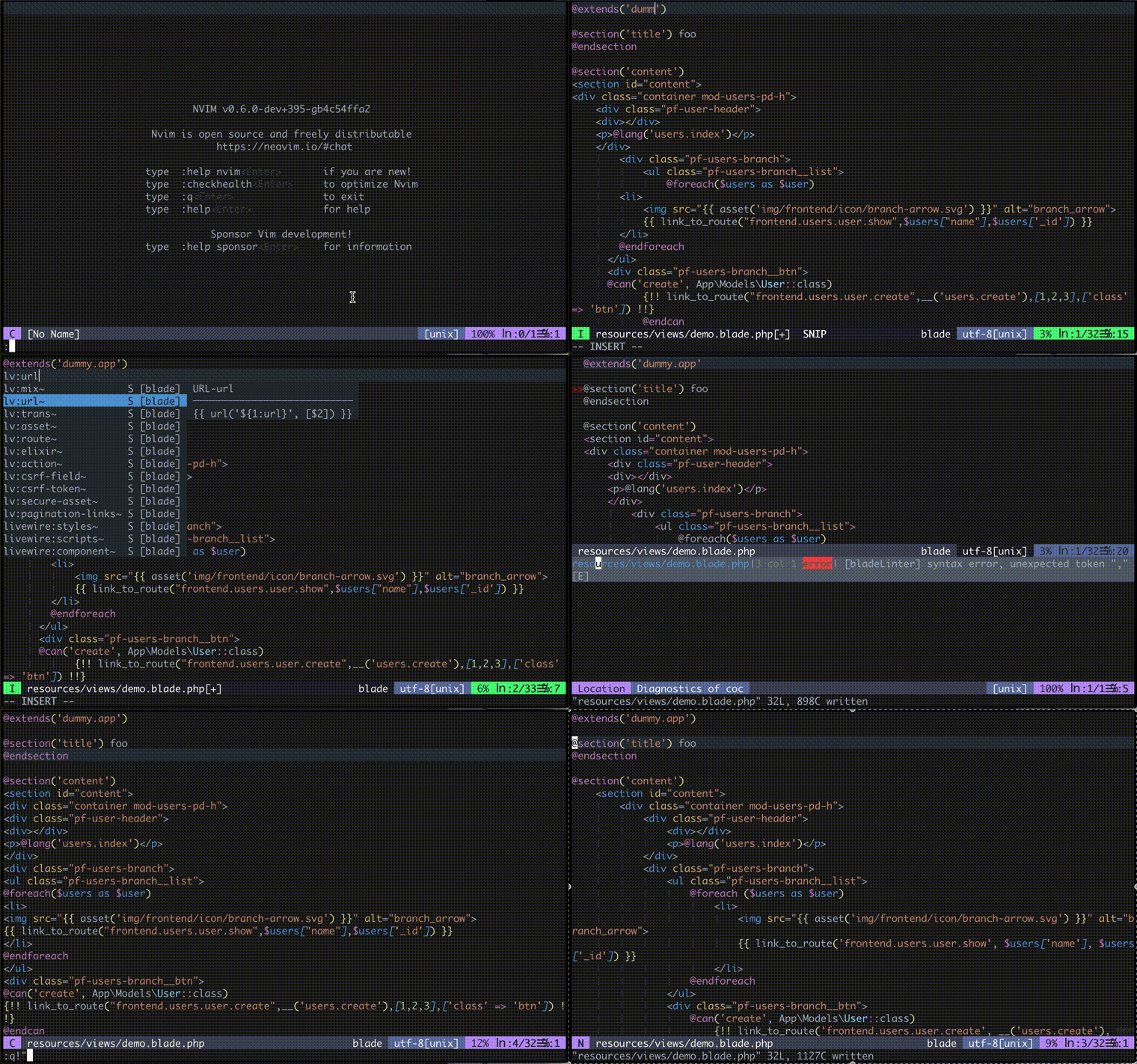
Features
- Format
- Lint
- Completion
- Blade Snippets Completion
- Blade Directive Completion
- Definition
- Jump to template file specified by
@extends,@includedirective, etc. - Jump to "Blade Components" file.
- [Warning] Class-based Components are not supported.
- Jump to "Jetstream Components" file.
- Jump to template file specified by
- Code Action
- Add a blade comment to disable the formatting.
- Hover
Install
CocInstall:
:CocInstall coc-blade
vim-plug:
Plug 'yaegassy/coc-blade', {'do': 'yarn install --frozen-lockfile'}
Recommended coc extension:
(Optional) Additional installation of laravel blade related coc-extension
- @yaegassy/coc-laravel
- Various completions, definitions, references, hovers, diagnostics, codeActions, artisan and sail commands integration and more features for Laravel projects.
- @yaegassy/coc-intelephense
- intelephense (PHP language server) extension for coc.nvim. intelephense's various LSP features and this extension's additional features are available.
- coc-html
- html-related support will be added in blade
Note
Filetype related
The "filetype" must be blade for this extension to work.
Install "blade" related plugin (e.g. jwalton512/vim-blade or sheerun/vim-polyglot or nvim-treesitter with tree-sitter-blade).
For more information on setup tree-sitter-blade in nvim-treesitter, please click here.
Usage Topics
formatter (blade-formatter)
Run:
:call CocAction('format'):CocCommand bladeFormatter.run
If there is a "syntax error" in the blade template, the formatting will fail.
Configuration file: .bladeformatterrc.json or .bladeformatterrc:
To configure settings per project, put .bladeformatterrc.json or .bladeformatterrc to your project root will blade-formatter treat it as setting files.
Configuration file will like below:
{
    "indentSize": 4,
    "wrapAttributes": "auto",
    "wrapLineLength": 120,
    "endWithNewLine": true,
    "useTabs": false,
    "sortTailwindcssClasses": true
}
Ignoring Files: .bladeignore:
To ignore specific file, put .bladeignore to your repository root will blade-formatter treat it as ignored files.
resources/views/users/index.blade.php
resources/views/products/*
resources/views/books/**/*
Disabling format in file:
In coc-blade, there is a code action feature to add a blade comment to disable the formatting.
linter (using Stillat/blade-parser-typescript)
This feature is enabled by default. If you do not need the linter feature, set blade.bladeParserLint.enable to false
snippets completion (laravel-blade-snippets-vscode)
You can auto-complete by typing b:, lv:, Blade::, livewire::.
It uses snippet files from onecentlin/laravel-blade-snippets-vscode to provide completion.
directive completion
You can auto-complete by typing @.
Code Actions
Example key mapping (Code Action related):
nmap <silent> ga <Plug>(coc-codeaction-line)
nmap <silent> gA <Plug>(coc-codeaction)
Actions:
Add "blade-formatter-disable-next-line" for this lineAdd "blade-formatter-disable" for this lineAdd "blade-formatter-enable" for this lineAdd "blade-formatter-disable" for whole file
Thanks
- shufo/blade-formatter
- shufo/vscode-blade-formatter
- Stillat/blade-parser-typescript
- onecentlin/laravel-blade-snippets-vscode
License
MIT
This extension is built with create-coc-extension
- Laravel Blade Templates extension for coc.nvim
- onLanguage:blade
Want to build, test, or contribute to coc.nvim extensions? Explore our official SDK and testing toolkits.
Open Developer GuideVersion History
This published npm package does not include a history.md or changelog.md file. Browse its npm versions or repository releases for available release information.
Contributed Commands
All contributes.commands entries from the published package manifest for coc-blade@0.18.11.
| Command (:CocCommand) | Description |
|---|---|
| blade.showOutput | Show blade output channel |
| blade.bladeFormatter.run | Run bladeFormatter.run |
| blade.showReferences | Show BladeDirective (`@...`) or BladeEcho (`{{ ... }}`, `{!! ... !!}`) location information for the current file |
Configuration Schema
All contributes.configuration entries from the published package manifest, including each raw property schema for coc-settings.json.
Raw JSON Schema
{
  "type": "boolean",
  "default": true,
  "description": "Enable coc-blade extension"
}Raw JSON Schema
{
  "type": "boolean",
  "default": true,
  "description": "Enable completion feature"
}Raw JSON Schema
{
  "type": "boolean",
  "default": true,
  "description": "Enable/Disable the linting feature by laravel-blade-linter"
}Raw JSON Schema
{
  "type": "boolean",
  "default": true,
  "markdownDescription": "Enable/Disable the formatting feature by blade-formatter"
}Raw JSON Schema
{
  "type": "boolean",
  "default": false,
  "description": "Output the results of the parsing of stillat-blade-parser to the channel log"
}Raw JSON Schema
{
  "type": "boolean",
  "default": true,
  "description": "Enable/Disable the linting feature using stillat-blade-parser"
}Raw JSON Schema
{
  "type": [
    "boolean"
  ],
  "default": false,
  "markdownDescription": "Use tab as indentation character"
}Raw JSON Schema
{
  "type": "boolean",
  "default": true,
  "markdownDescription": "Enable snippets completion"
}Raw JSON Schema
{
  "type": "boolean",
  "default": true,
  "markdownDescription": "Enable directive completion"
}Raw JSON Schema
{
  "type": "array",
  "default": [],
  "description": "Exclude specific prefix in snippet completion"
}Raw JSON Schema
{
  "enum": [
    "LF",
    "CRLF"
  ],
  "type": [
    null,
    "string"
  ],
  "default": null,
  "markdownDescription": "End of line character(s)."
}Raw JSON Schema
{
  "type": [
    null,
    "integer"
  ],
  "default": null,
  "markdownDescription": "Indent size"
}Raw JSON Schema
{
  "type": "array",
  "default": [],
  "description": "A list of custom if directives"
}Raw JSON Schema
{
  "type": "array",
  "default": [],
  "description": "Comma separated list of tags that should have an extra newline before them"
}Raw JSON Schema
{
  "type": "array",
  "default": [],
  "description": "A list of directives that can be parsed"
}Raw JSON Schema
{
  "type": "boolean",
  "default": false,
  "markdownDescription": "Use double quotes instead of single quotes for php expression"
}Raw JSON Schema
{
  "type": [
    "boolean"
  ],
  "default": true,
  "markdownDescription": "End output with newline"
}Raw JSON Schema
{
  "enum": [
    "auto",
    "force",
    "force-aligned",
    "force-expand-multiline",
    "aligned-multiple",
    "preserve",
    "preserve-aligned"
  ],
  "type": [
    null,
    "string"
  ],
  "default": null,
  "markdownDescription": "The way to wrap attributes"
}Raw JSON Schema
{
  "type": [
    null,
    "integer"
  ],
  "default": null,
  "markdownDescription": "The length of line wrap size"
}Raw JSON Schema
{
  "type": "boolean",
  "default": false,
  "markdownDescription": "Indent `<head>` and `<body>` tag sections in html"
}Raw JSON Schema
{
  "type": "boolean",
  "default": false,
  "markdownDescription": "Disable PHP syntax check. Enabling this will suppress PHP syntax error reporting"
}Raw JSON Schema
{
  "type": "array",
  "default": [],
  "description": "A list of directive names that should be ignored"
}Raw JSON Schema
{
  "type": "boolean",
  "default": false,
  "markdownDescription": "If set to true, no trailing commas are printed for php expression."
}Raw JSON Schema
{
  "enum": [
    "none",
    "alphabetical",
    "code-guide",
    "idiomatic",
    "vuejs",
    "custom"
  ],
  "type": [
    "string"
  ],
  "default": "none",
  "markdownDescription": "Sort HTML Attributes in the specified order"
}Raw JSON Schema
{
  "type": [
    "boolean"
  ],
  "default": false,
  "markdownDescription": "Collapses multiple blank lines into a single blank line"
}Raw JSON Schema
{
  "type": [
    null,
    "boolean"
  ],
  "default": false,
  "markdownDescription": "Sort Tailwindcss classes automatically. This option respects `tailwind.config.js` and sort classes according to settings"
}Raw JSON Schema
{
  "type": [
    null,
    "integer"
  ],
  "default": null,
  "markdownDescription": "Minimum number of html tag attributes for force wrap attribute options. Wrap the first attribute only if 'force-expand-multiline' is specified in wrap attributes"
}Raw JSON Schema
{
  "type": [
    null,
    "string",
    "array"
  ],
  "default": null,
  "description": "Comma separated custom HTML attributes order. To enable this you must specify sort html attributes option as `custom`. You can use regex for attribute names"
}